A familiar problem in forex trading: a setup looks attractive on the chart, but the trade feels less attractive once the spread, execution and account-level risk are considered. A nominal 1:2 reward-to-risk ratio is useful shorthand. It is not, by itself, a complete answer to what you could gain or lose.
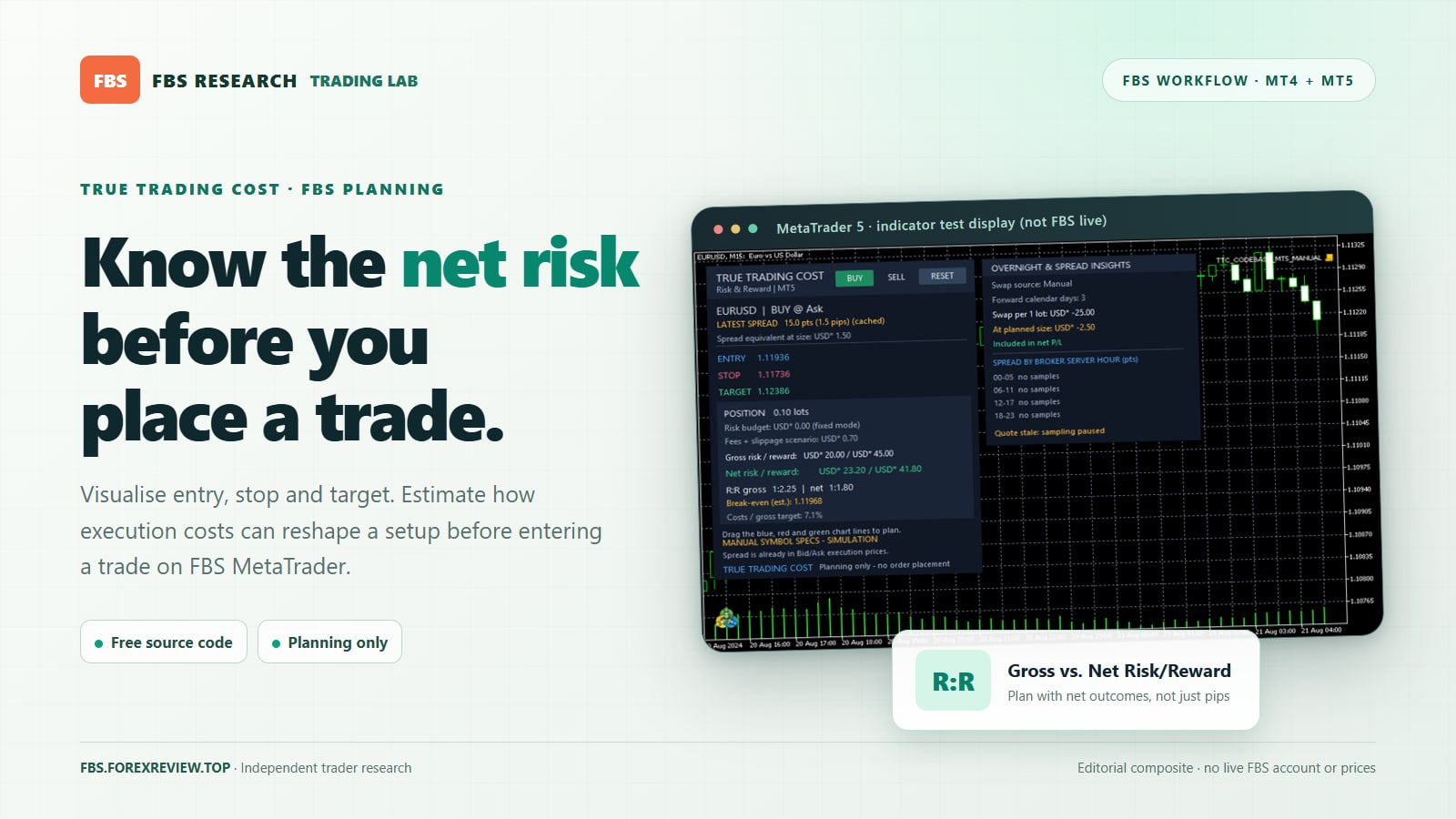
For traders using FBS MetaTrader 4 or MetaTrader 5, the free True Trading Cost - Net Risk Reward Calculator adds a practical layer to that decision. You can map a hypothetical entry, stop-loss and take-profit directly on the chart, then examine estimated position size, costs and net risk/reward before deciding whether to place an order. It is a planning indicator, not an automated trading system or a source of entry signals.
Why a cost-aware calculator makes sense on FBS
FBS provides both MetaTrader 4 and MetaTrader 5, where traders can work with custom indicators. The True Trading Cost tool has separate, free, source-included releases for MT4 and MT5.
FBS states on its official trading conditions page that its spreads are floating and that its published offering has no trading commission. That does not make every trade cost-free. Spreads vary with the symbol and conditions, and the eventual outcome can also be affected by slippage and overnight financing where applicable. Always check the actual account, contract specification and transaction history rather than applying a generic broker-cost preset.
Benefit 1: See the difference between chart R:R and net R:R
Suppose a trader marks a 25-pip stop and a 50-pip target. On paper, that is a gross 1:2 setup. The tool translates planned price distances into account-currency risk and reward using available symbol specifications, and then models relevant charges. The purpose is not to turn an uncertain trade into a safe one. It is to reveal whether the reward remains interesting after reasonable cost assumptions.
This matters especially when the target is relatively small. A few units of trading cost can be negligible on one strategy and material on another. A clean net-R:R comparison helps you tell the difference.
Benefit 2: Work out position size from risk, not instinct
Instead of beginning with an arbitrary lot size, you can specify a percentage of account equity and let the indicator calculate a permitted volume for the planned stop distance. It rounds the suggested lot down to the instrument's supported volume steps. If the desired risk budget is too small even for the minimum allowed lot, it does not quietly increase the position to make the trade possible.
This is a useful discipline for FBS traders comparing a major currency pair with a metal or another CFD: different symbols have different tick values, contract rules and price movements. A familiar-looking number of points does not necessarily carry a familiar monetary risk. Fixed-lot planning is also supported for traders who intentionally use a fixed volume.
Benefit 3: Move three lines and rethink the whole setup
After attaching the indicator to a chart, select BUY or SELL to initialise the hypothetical trade. Three draggable levels do the rest: blue for Entry, red for Stop and green for Target. Moving a line updates the planned amounts, suggested size, break-even estimate and net risk/reward. RESET returns the levels to a fresh starting configuration based on quoted prices and an ATR-derived reference.
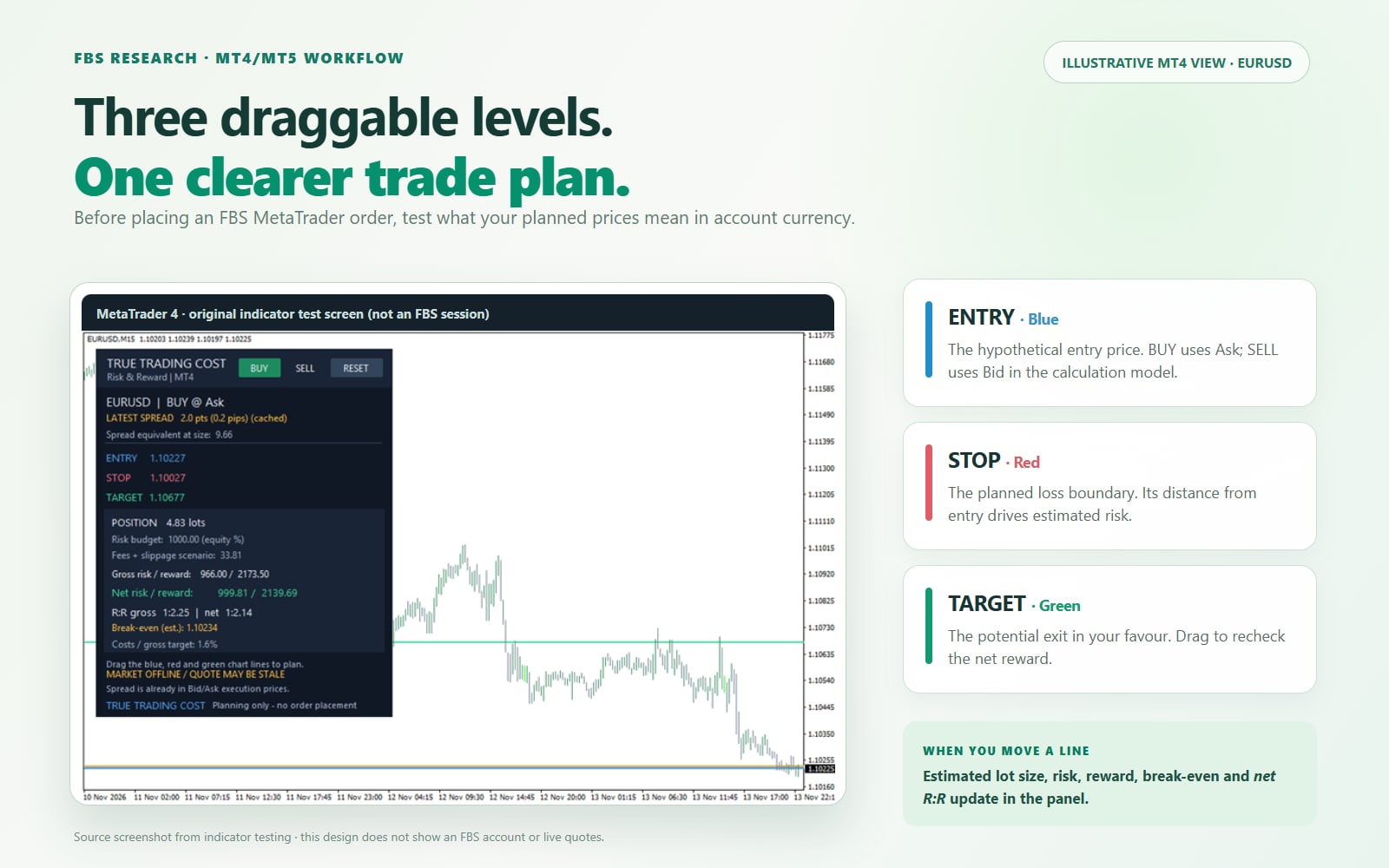
For example, when market structure suggests a wider stop, you can drag the stop to that level and immediately see the change in suggested lot size. That is more useful than tightening the stop simply to preserve a preferred position size.
Benefit 4: Treat spread correctly rather than counting it twice
One important design detail is easy to miss. The indicator models a BUY entry at Ask and an exit at Bid; a SELL enters at Bid and exits at Ask. The spread is therefore already represented in the executable-price differences used by the calculation. Its displayed spread-equivalent value is informational, not an extra fee to add a second time.
That distinction is particularly relevant when comparing an FBS quote with a manual pip calculator. Double-counting spread can overstate costs, while ignoring the Bid/Ask difference can understate them.
Benefit 5: Stress-test fees, slippage and overnight holding
The calculator can include entered round-trip commission, extra fees and estimated slippage. If the verified commission for the actual account and symbol is zero, use the corresponding input rather than inventing a charge. If a charge exists, confirm whether the figure is per side or for the full opening-and-closing cycle before entering it.
An additional panel can show optional swap estimates and observed spread information split into four six-hour periods of broker-server time. Spread samples accumulate only while the indicator is running and are not a historical broker-wide average. Swap handling depends on supported quote and broker specification modes, calendar settings, rollover days and other assumptions. For an overnight trade, cross-check financing details against FBS's current symbol specifications.
A simple example: an appealing target after costs
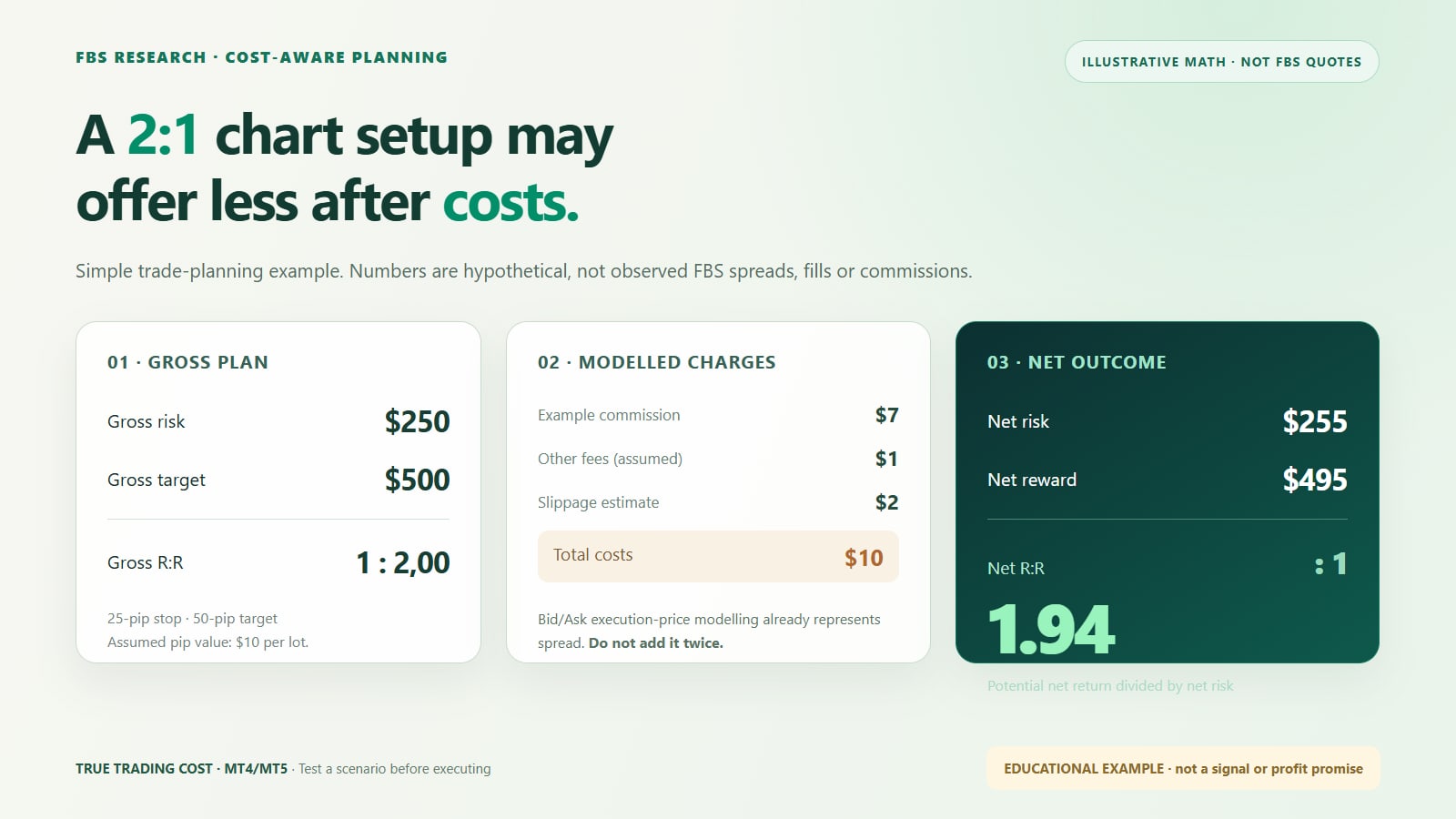
Consider a purely illustrative EURUSD plan with one lot, a $10 assumed pip value, a 25-pip stop and a 50-pip target. The starting monetary risk is $250 and the potential gross reward is $500. Now assume $5 in additional modelled costs across the trade. The result is a $255 estimated net loss if stopped out and a $495 estimated net gain if the target is reached. The net reward-to-risk estimate becomes approximately 1.94:1, rather than 2:1.
These are simplified educational numbers, not live or historical FBS charges. Bid/Ask spread treatment is already accounted for in the calculator's trade-price model; the hypothetical $5 here is not a second spread deduction.
How to use True Trading Cost with an FBS MetaTrader account
- Choose your platform. Use the MT4 indicator with desktop MetaTrader 4 or the MT5 version with desktop MetaTrader 5. These are separate source files, not interchangeable builds.
- Download from the MQL5 Code Base. Obtain the indicator from the official pages linked above, install or compile it in the matching MetaTrader environment, and locate it in Navigator.
- Check the FBS instrument specification. In MetaTrader, review the symbol's contract size, tick information, lot increments, trading conditions and swap details. Do not assume every CFD behaves like EURUSD.
- Configure your budget and charges. Set the intended equity-risk percentage or fixed lot; enter verified commissions and extra fees if applicable. Leave uncertain assumptions identifiable.
- Build a hypothetical plan. Choose BUY or SELL, then drag Entry, Stop and Target. Read the suggested lot, net risk, net reward, break-even and cost-to-target indication.
- Apply a final real-world check. Confirm margin availability, stop-level requirements, market conditions and the live quote yourself before deciding whether to submit an order.
Where the calculator stops being reliable
This is an estimation tool. It does not submit, modify or close orders, and it does not guarantee a quoted execution price, future spread, slippage, swap or profit. It also does not validate free margin, broker stop-distance rules or eventual order acceptance. The calculations depend on valid symbol and account data; the optional manual-specification mode is a labelled simulation, not proof of real FBS costs.
Use it as a pre-trade checklist, not as a substitute for reviewing the official contract specifications or the actual charges recorded after execution. A better-informed loss is still a loss, and leveraged forex/CFD trading can result in substantial financial harm.
Is it worth adding to an FBS workflow?
For a discretionary trader who already knows where a sensible entry, stop and target should be, the practical benefit is clarity. True Trading Cost turns a chart idea into a testable risk budget, puts likely cost assumptions in view and makes it easier to reject a setup whose net numbers are unattractive. It complements analysis; it does not replace it.
For the wider feature breakdown, see our True Trading Cost MT4/MT5 guide on ForexReview.top.
Considering FBS for MT4 or MT5 trading? Review the broker's platform and instrument conditions first, then test a trade-planning workflow on a demo account before risking capital.
Affiliate disclosure: This link may support FBS Research. Broker eligibility, terms and availability vary by jurisdiction. Trading involves risk.
Quick questions
Does the calculator place trades on FBS automatically?
No. BUY, SELL and RESET manage a hypothetical chart plan; the indicator does not send trading orders.
Can it be used on FBS MT4 and FBS MT5?
There are separate free versions for each MetaTrader desktop platform. Install the build that matches your terminal.
Does it know my actual trading commission and swap in advance?
Not with certainty. Commission inputs and swap estimates require verification, and actual charges depend on your account, symbol and execution or rollover conditions.
Can a good net R:R make a trade profitable?
No. The ratio describes a hypothetical payout relative to risk; it says nothing conclusive about the probability of a winning trade.
